Free CareID wallpaper
Give someone helping you a place to start.
Add a CareID QR code to your phone’s lock screen. Someone can scan it with another phone to open general emergency guidance for the condition you choose.
Create my free wallpaper See what a scan opensNo purchase required. No app to install.
The free version provides condition guidance. Personal emergency contacts and medical details are an optional paid addition.

From your phone to their next step
See what someone
can open.
Your wallpaper points to the guide you select. Here is an example of what the person scanning it would see.
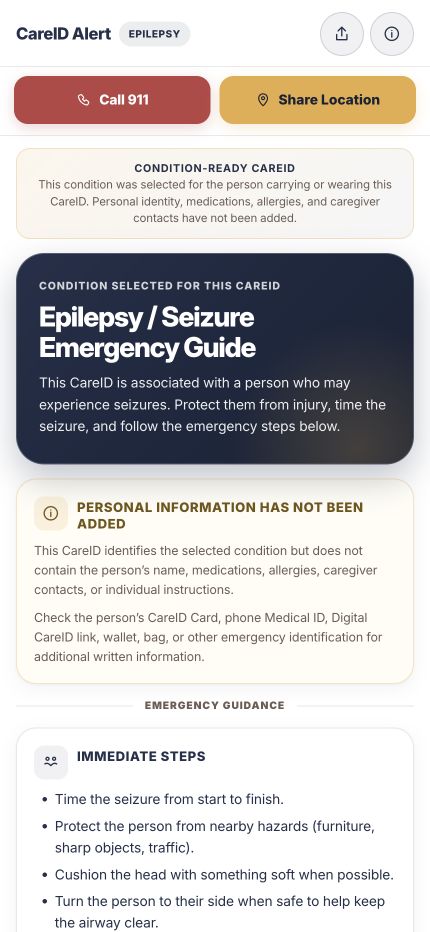
An epilepsy example
Guidance first.
Personal details optional.
Condition-Ready™ means guidance is available before personal-profile setup. The free result does not include your contacts or medical details.
Open example guideYou can open the example on this phone. No email or CareID creation is needed.
About medical reviewA wallpaper can help only when the phone is available, the code is visible, and someone notices it. It does not replace emergency services.
A free place to start
Create your
free wallpaper.
Choose the guidance your QR should open, then the layout that fits your phone.
Your selection is yours to make. The epilepsy example above does not select a guide for you.
Created · Ready to download
Your wallpaper is ready.
Download the image, then set it as your phone’s lock screen.
Image ready. Installation has not been confirmed.
How to set it as your lock screen
If you are in Facebook’s browser, open this page in Safari or your usual browser if saving is unavailable.
Keep access to this CareID
Save it to My CareID so you can find and manage it later.
Open My CareID ↗Ownership is verified securely when you save. Entering an email does not verify ownership.
Want your emergency contacts available, too?
Personalized CareID adds the emergency details you choose to share.
Verify ownership in My CareID, then explore personalization for this same CareID. Your QR stays the same.
Good to know
What’s free.
What’s optional.
FreeA lock-screen access point to general guidance for the selected condition.
Optional personalizationPerson-specific emergency information that the owner chooses to share.
What happens when someone scans?
The QR opens online guidance for your selected condition. A helper can open it without signing in. Free guidance does not contain your personal contacts or medical details.
Why do you need my email?
Your email supports ownership and recovery of the same CareID. Saving to My CareID uses secure verification; typing an email alone does not save it to an account. Marketing updates are optional.
Does the guide work without internet?
No. The person opening the online guide needs an internet connection. The wallpaper contains the QR access point; the full guide is not stored in the image.
Why is it free?
It’s a way to start using CareID without a purchase. We also offer paid personalization and physical CareID products, but buying them is optional.