A little thanks for the care you give.
For teams supporting people living with epilepsy
An emergency ID resource for the families you support.
CareID connects a scan to condition-specific emergency guidance, with the option to add personal emergency information. Preview the experience, then share a free starting point with patients and caregivers.
See what a CareID scan opens Get free patient-sharing materialsYour team shares the resource.
Families manage their own setup.
The experience, up close
See what a scan opens.
Demo only — fictional information. Not for emergency use.
Epilepsy / Seizure
Emergency Guide
Condition-Ready · No personal emergency details added.
Personalized · fictional example
Alex Example
Details supplied by an owner or caregiver.
- Condition
- Epilepsy
- Language
- English
- Communication
- Prefers short, calm sentences.
- Emergency contact
- Demo caregiver · no phone number
- Allergies / medications
- Not supplied in this example.
Immediate Steps
- Time the seizure from start to finish.
- Protect the person from nearby hazards (furniture, sharp objects, traffic).
- Cushion the head with something soft when possible.
- Turn the person to their side when safe to help keep the airway clear.
- Monitor breathing throughout and after the seizure.
More of the approved guide
Call 911 Immediately If:
- The seizure lasts longer than 5 minutes
- They have difficulty breathing or do not regain consciousness
- They have multiple seizures without regaining consciousness
- The seizure occurs in water
- They are injured during the seizure
- This is their first known seizure
Do Not:
- Do not restrain the person or hold them down
- Do not place anything in their mouth
- Do not give food or drink until they are fully alert
- Do not leave them alone during or immediately after the seizure
- Do not administer rescue medication unless following verified personal instructions or trained caregiver direction
After the Immediate Situation
- Stay with the person until they are fully alert and oriented
- They may be confused, tired, or have a headache
- Offer reassurance and a quiet place to rest
- Contact their emergency contact if found on ID
A helper opens the online page without a login. Calls, messages, location sharing, and account actions are disabled in this demo.

Personalized when you’re ready.Start with a free wallpaper.
Shown: Bracelet and Card, optional paid formats.
Free patient-sharing kit
A small introduction.
A helpful starting point.
Give families a free way to start exploring CareID. Choose the resource that fits the way your team shares information.
Free to share · No registration · No affiliate membership
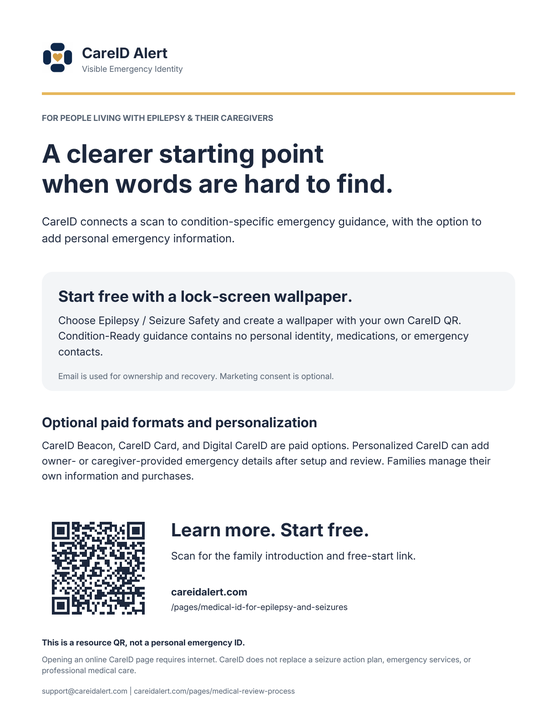
A resource to take home.
A clear introduction, the free starting point, and a QR link for families to explore.
Download handoutPDF · US Letter · Print at actual size
One link. Their next step.
This link opens the family introduction, with the free wallpaper and current paid options.
View or select the link
The words are here, too.
Share through your organization’s approved communication channels.
Read the ready-to-copy explanation
What is free, and what costs money?
The lock-screen wallpaper and condition-specific emergency guidance are free. The wallpaper creator asks for an email for ownership and recovery; optional marketing consent is separate. CareID Bracelet, CareID Card, Digital CareID, and personalization are paid options. Personalization requires family setup and review. See current options and prices.
Does our team have to manage patient profiles?
No. Share this public resource if it is appropriate for your organization. Families manage their own setup, information, and purchases. No clinic account or profile-management responsibility is required. Owners use their own account when managing CareID; helpers can open emergency information without a login.
Does it need an internet connection?
Yes. Opening an online CareID emergency page requires a compatible device and an internet connection. A saved wallpaper can remain visible offline, but its QR destination still needs internet. Maintain appropriate physical backups.
What has been medically reviewed?
CareID’s condition-guide content and emergency communication structure were reviewed by James Jackson, MD, Emergency Medicine. Owner- or caregiver-provided profile details are separate and are not individually medically verified by that review. Read the review scope and process.
Are we being asked to become an affiliate?
No. Your team can evaluate and share these materials without applying to an affiliate program, receiving commissions, or creating a clinic account.
Please do not send patient information. CareID supports emergency identification and information access; it does not replace a seizure action plan, emergency services, or professional medical care.
Contact CareID ↗